Can AI Generate Professional Painting Lessons?
· Editorial Team · 9 min read
Table of Contents
- What AI Can Actually Generate for a Painting Class
- AI Tools for Art Teachers: What They Do and Don't Do
- How to Write a Painting Lesson Plan With AI in Five Steps
- Painting Workshop Curriculum Templates You Can Build in Minutes
- Where AI Painting Lessons Fall Short
- Who Gets the Most Out of AI-Generated Lessons
- Conclusion
- Frequently Asked Questions
Last Updated: September 22, 2026
What AI Can Actually Generate for a Painting Class
Can AI generate professional painting lessons? Yes, with real limits. Modern AI tools can produce a full class-ready design, a step-by-step teaching guide, a color list, and a printable plan in seconds. This guide from PaintPrompt breaks down exactly what works, what doesn't, and how to use these tools without losing your own style.
AI painting lessons are teaching materials built by artificial intelligence that turn a simple text idea into a structured class plan. You describe what you want, like "a sunset over a lake," and the tool returns a composition, steps, and a supply list.
That sounds simple. The reality is more interesting.
Most tools handle the planning well and the teaching poorly. They can draft a lesson. They cannot stand in front of twelve beginners and read the room.
Here's the key insight: AI is a planning assistant, not a replacement instructor. ISTE guidance on AI in education makes the same point for classrooms generally. The tool drafts. You decide.
Below, we'll show you exactly how to use AI to cut prep time without handing over your creative judgment.
AI Tools for Art Teachers: What They Do and Don't Do
AI tools for art teachers split into two groups: generators and planners.
Generators create the artwork concept. You type an idea, and the tool produces a design you can teach.
Planners turn that design into a class structure. Steps, timing, supplies, and a printable handout.
What they do well:
- Turn a vague idea into a concrete composition
- Break a painting into 8-12 teachable steps
- Build a color list matched to the design
- Format everything into a printable guide
What they don't do:
- Adjust for the mood of a live room
- Fix a step that confuses students in real time
- Replace your demo or your encouragement
A common mistake is expecting the tool to produce a finished, flawless lesson on the first try. It won't. Think of it as a fast first draft.
How to Write a Painting Lesson Plan With AI in Five Steps
Total Time: 20-30 minutes Difficulty: Beginner-friendly
Learning how to write a painting lesson plan with AI takes about half an hour the first time and far less after that. The process is the same whether you teach two classes a week or twenty.
What You'll Need
- A clear idea of the painting you want to teach
- An AI lesson tool that outputs steps and a supply list
- A canvas and your own paints for a test run
Step 1: Describe Your Idea in Plain Words [Time: 3 minutes]
Write one or two sentences. "A lighthouse at dusk with a purple sky." Skip the art jargon. The clearer the idea, the better the output.
Step 2: Generate the Design and Guide [Time: 2 minutes]
Run it through the tool. You should get a full design plus a step-by-step guide and color list.
Step 3: Read the Steps Out Loud [Time: 5 minutes]
This catches the weak spots. If a step confuses you, it will confuse your students.
Step 4: Test-Paint the Canvas [Time: 10 minutes]
Paint it yourself, fast. Note where you slow down. That's the step to expand.
Step 5: Edit and Print [Time: 5 minutes]
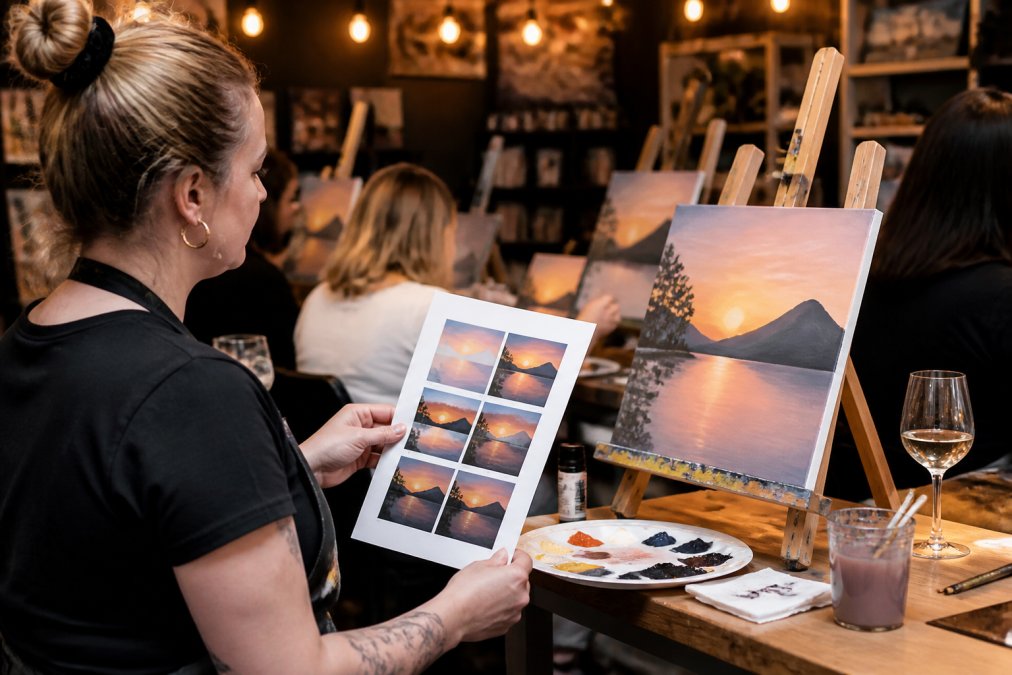
Trim, add your own tips, and print one guide per guest.
Expected Result: A class-ready lesson you've already proven works.
Painting Workshop Curriculum Templates You Can Build in Minutes
Painting workshop curriculum templates are reusable class structures you fill with a new design each time. Instead of planning from scratch, you keep a format and swap the painting.
Here's a simple template you can copy:
| Section | What Goes Here | Time |
|---|---|---|
| Warm-up | Sketch the main shapes in pencil | 5 min |
| Background | Block in the sky and base colors | 15 min |
| Midground | Add the main subject | 20 min |
| Details | Highlights, texture, final touches | 15 min |
| Wrap-up | Sign, dry, and photograph | 5 min |
Build one template for each class type you run. A date night template. A kids' party template. A corporate team-building template.
Then all you change is the design. PaintPrompt generates a fresh class-ready design with a 10-step guide, a color list, and a printable teaching plan in seconds. Dana R. runs a studio and put it this way: "We use it to plan themed nights for our studio. A new design and instructions in under a minute."
That's the real time savings. Not the first lesson. The fiftieth.
Where AI Painting Lessons Fall Short
AI-generated painting lessons fall short in three places: live teaching, complex techniques, and originality.
First, no tool can read a room. When a guest panics because their sky looks muddy, that's on you.
Second, advanced techniques are hit or miss. Wet-on-wet blending, glazing, and fine detail work often need a human touch in the steps.
Third, originality. If you feed the same prompt as everyone else, you get similar results. Your spin is what makes it yours.
A common mistake is treating the AI output as final. It's a draft. The instructor makes it teachable.
Who Gets the Most Out of AI-Generated Lessons
The people who benefit most from AI-generated lessons are instructors who teach often and plan alone.
- Paint and sip studio owners running recurring events who need a fresh design every week
- Freelance art instructors who want structured, class-ready plans without hours of prep
- Corporate event planners building team activities that need easy, follow-along guides
- Beginner painters who want low-stress, step-by-step instructions at home
If you teach once a year, a template pack may be enough. If you teach weekly, the math changes fast.
Claire T., an instructor, noted the shape guide made a real difference: "My class could actually see how to block the picture in."
That detail matters. Beginners don't fail because they lack talent. They fail because they can't see the first shapes.
Conclusion
The honest answer to whether AI can generate professional painting lessons is: it can generate the plan, and you make it professional. The tool handles the structure, the steps, and the supply list. You handle the room, the demo, and the encouragement.
That division of labor is exactly what PaintPrompt was built for. It gives you class-ready designs with 10-step instructions, a color list, and a printable teaching guide, all built by real paint and sip hosts. You can plan a full month of classes in minutes and never run out of ideas.
Ready to stop planning from scratch? Generate my class design with PaintPrompt and walk into your next class already prepared.
Frequently Asked Questions
Can AI create structured art lesson plans?
Yes. Modern tools take a short prompt, like "autumn lake at sunset," and return a full class structure: a composition breakdown, a numbered step sequence, a color list, and a printable teaching sheet. The output is a plan, not a finished artwork, which is exactly what an instructor needs. You still decide the pace, the music, and how much you demo live. The plan handles the prep work that used to eat your evenings.
Is AI-generated content suitable for professional painting workshops?
It works when the tool is built for teaching, not just image making. A generic image generator gives you a picture with no path to reproduce it. A class-focused tool gives you the block-in shapes, the order of layers, and the colors mixed at each stage. Check that the design is beginner-friendly and completable in your session length before you run it with paying guests.
What are the limitations of using AI for art instruction?
AI cannot read your room. It does not know that one guest is struggling with brush control or that your drying time runs long in humid weather. Color mixing on screen never matches your actual pigments, so you test the palette yourself first. Treat the generated plan as a strong first draft, then adjust timing, simplify shapes, and add your own teaching cues before class.
How do I use AI to generate a step-by-step painting guide?
Describe the subject, the difficulty level, and the session length in your prompt. The tool returns a sequence of steps with the shapes to block in first, the colors for each stage, and a printable guide for guests. Print one sheet per easel so students can follow along without crowding your demo. Run the painting once yourself to confirm the steps flow before you teach it.